

A quick 101 on what a language model actually is, for anyone who hasn’t had the pleasure.
A language model takes text, chops it up into chunks called tokens (basically words, close enough for this post), and predicts the next token by running the current ones through an enormous pile of numbers called weights. The numbers multiply, add, do some nonlinear stuff, and a probability distribution over possible next tokens pops out at the far end. You sample a token, stick it on the end of the input, run the whole thing again, and eventually you have a sentence. The weights got that way through training, a process where the model sees an absolute shit-ton of text and keeps nudging its own numbers (a gazillion attempts, give or take... I may be rounding slightly) until it gets decent at the next-token game. Nobody sat down and wrote a weight. They shook out by sheer brute force.
So the tokens coming out the other end are “statistically plausible continuations” (which is just a fancy way of saying “most expected” and I will never get used to how dreadfully academic the folks doing most of this research feel the need to be about their word choices) of the tokens going in. They just happen to look like English. It’s math with things that look like letters and, shockingly, it works pretty well.
The weirdest part though is that we don’t actually know, in any detailed way, what those weights are DOING. Not in the marketing sense, where every company says “we care deeply about transparency” and then ships another closed-weights API. I mean literally. A bunch of extremely smart researchers can’t tell you why GPT-4 answered a given question the way it did (if they claim they can, they’re either trying to sell you something, or they’re confused), and we’re also rolling these damn things out to hundreds of millions of people at the same time (which is… probably fine, right?).
There’s a whole field called mechanistic interpretability that tries to fix this. It has a bunch of great tools (TransformerLens, SAELens, Neuronpedia, things like that), it has great researchers… and it has a pretty serious accessibility problem.
The tools assume you already know what “attention” is, what a “residual stream” is, how hooks work in PyTorch, and that you’re comfortable cloning a repo and sitting through a twelve-minute Python install while one dependency decides whether it likes your CUDA version today.
I grew up on command lines and troubleshooting BBS connections, and even I run into wall after wall just getting these things running, let alone understanding what I’m looking at once they are.
So I built Pry.
Pry is a local desktop app (Windows only for now, GPU recommended, free and open source) that loads a small model (GPT-2 by default) and gives you a bunch of one-click interpretability tools with plain-English explanations for every panel. No code, no notebook, no dependency hell. You run the installer, it downloads the model weights and a Python runtime in the background, and a minute later you’re looking inside a transformer. GitHub is here if you want to skip to the head of the class.
The rest of this post is a tour of what you actually see when you do that, using the same demo prompts the built-in tutorial opens with.
Attention, using a cat
Pry’s tutorial opens with “The cat sat on the” and asks GPT-2 what comes next. This is the same prompt every interpretability demo has used since 2019, because it’s short, grammatical, and has a well-known textbook answer (”mat”). GPT-2 small doesn’t always land on mat in practice. It hedges between a handful of reasonable options (mat, floor, ground, bed, and a couple of others), and that hedging is actually what makes this a better demo than if the model just answered correctly every time. You get to watch it work.
The first tool Pry pulls up is the attention heatmap. Every time a transformer predicts the next word, each of its attention heads decides how much to care about each earlier word. Pick any head, you get a grid: rows are “the word doing the looking,” columns are “the word being looked at,” and the brightness of a cell is how much attention is flowing from one to the other. When the model is about to predict the word after “the,” you can watch which earlier words that final “the” looks back at. In GPT-2 small you’ve got 12 layers, 12 heads each, so 144 of these little grids, and they do not all look the same.
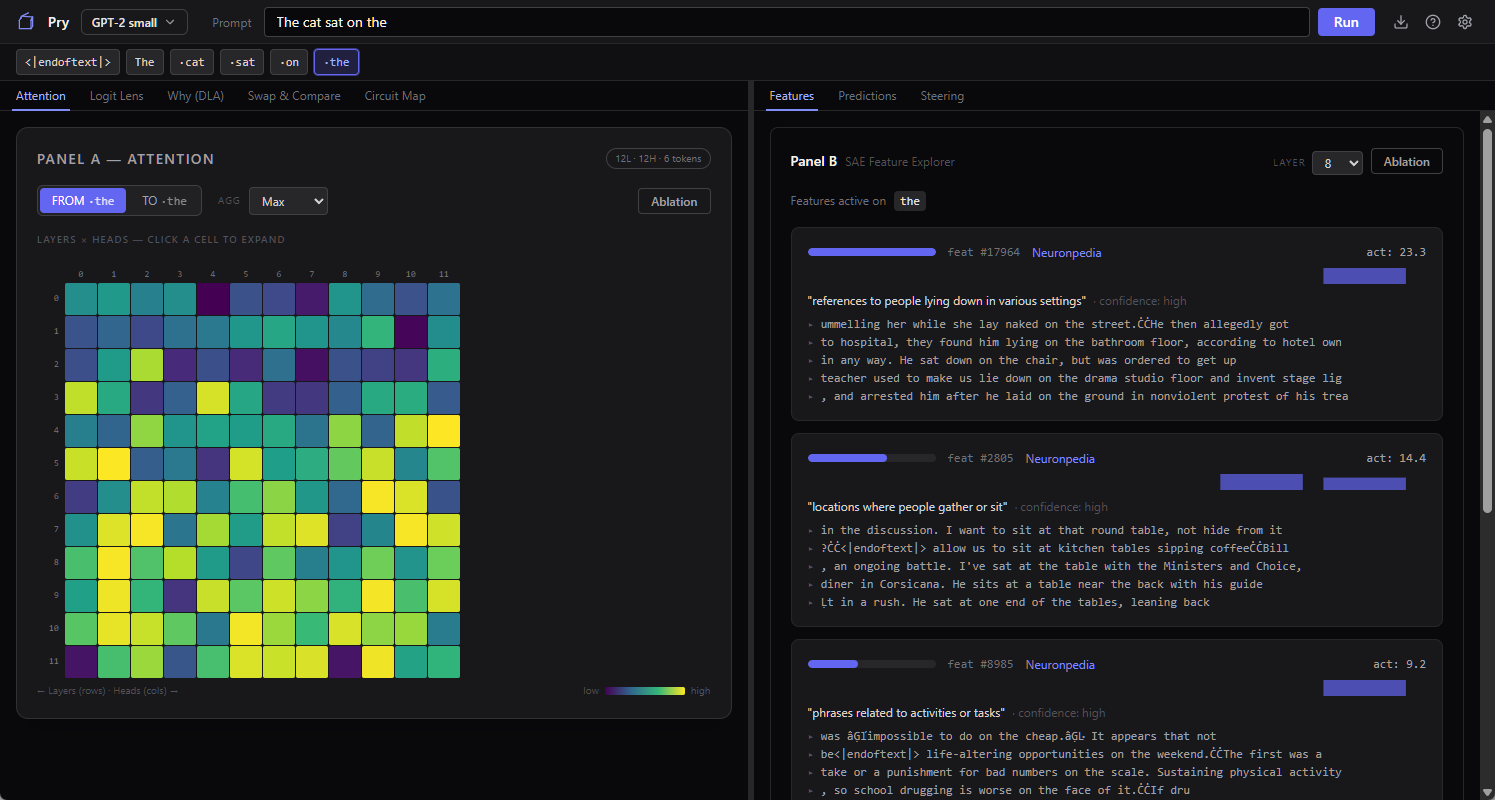
Some heads are doing grammar. You’ll see one where every word attends heavily to the word immediately before it, which is sort of the neural network equivalent of keeping your finger on the line while you read. Others are doing something more semantic, so “sat” pays attention to “cat” two tokens back, presumably because whoever’s sitting matters for what happens next. Then there are heads where the attention is smeared across everything and you shrug and say okay, I guess that one’s not specialized.
These heads are not something the model was designed to have. Nobody at OpenAI in 2019 sat down and said “we’ll make head 7 the grammar head.” The training process produced that behavior because it helped predict the next token, and the heatmap is just us going back afterwards and squinting at what shook out.
It’s sort of like archaeology with a video-card powered shovel.
The model changes its mind
Same prompt, different question. At each layer of the model, what does the model think comes next?
This is the logit lens. One of my favorite interpretability tools because the visual payoff is so clear. You get a heatmap with layers on one axis and candidate next-words on the other, the cell brightness is how much probability the model is putting on that word at that layer. With “The cat sat on the” as a prompt, you can see GPT-2 small kind of flailing at layer 1 (”latest” and “aclysm” and various subword junk lighting up), starting to converge around the middle layers, and locking in on “floor” by the top.
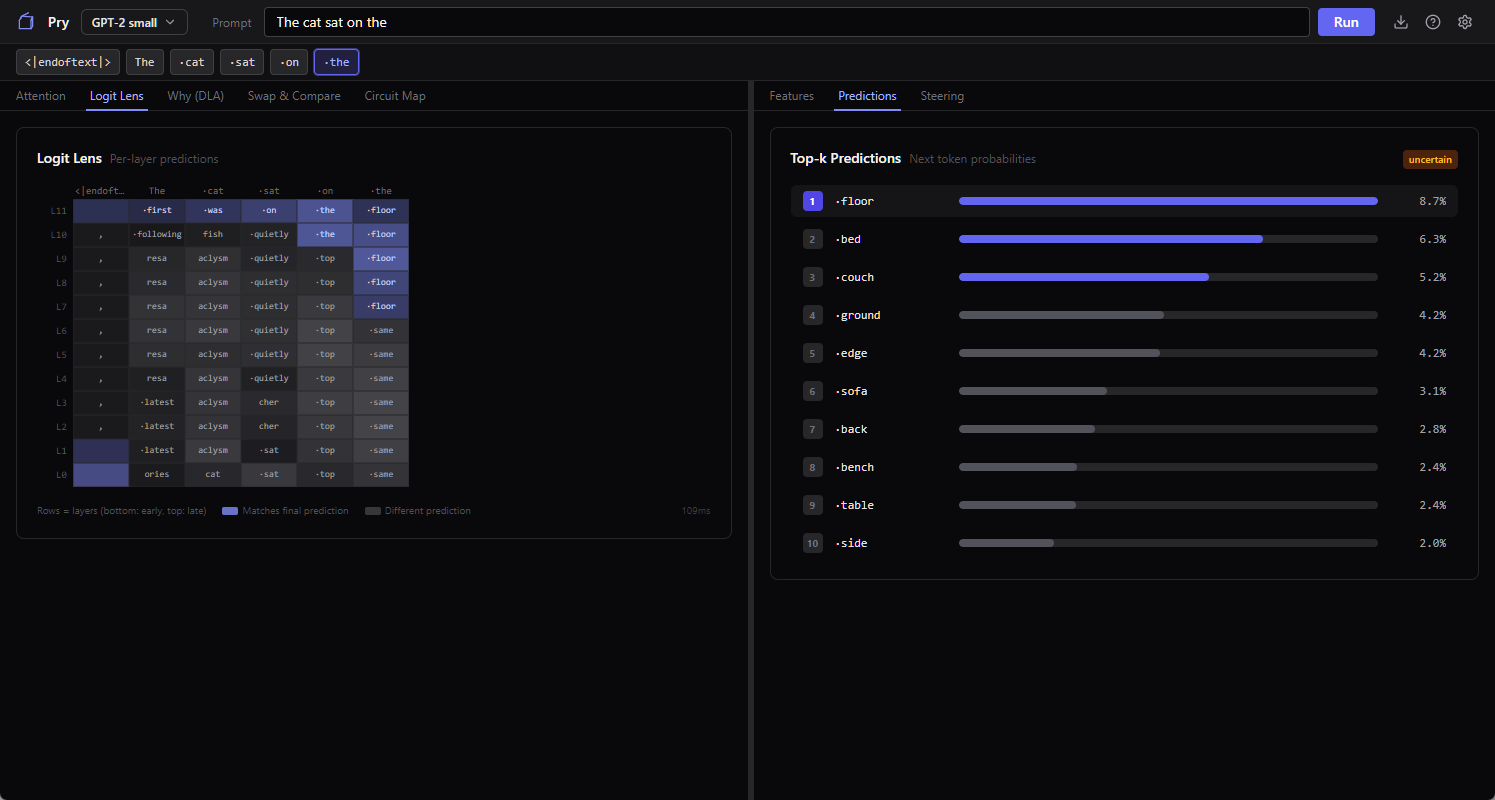
The model is constructing the answer one layer at a time, not retrieving it from storage. The logit lens lets you watch that happen in slow motion.
This is also where the failure modes of small models start to show. GPT-2 small sometimes commits to a token early and then talks itself back out of it at higher layers, and sometimes it never does. In this run it settles on “floor” around the middle layers and never reconsiders, even though “mat” is sitting right there as the canonical answer. Run it again and you might watch it flirt with “ground,” drift toward “couch,” and finally snap to “mat” at the top. Or it might not, and just confidently predict “floor” again, which is, you know, also a reasonable answer, just less of a vibes match.
What the model thinks about doctors
Switch the prompt. The tutorial’s second example is “The doctor told the nurse that ___” and it’s designed to show you how to look at the model’s internal concept vocabulary.
Quick background. The naive way to look inside a neural network is to stare at individual neurons. It turns out neurons are pretty bad units of analysis, because each one fires for like eight different unrelated things (the technical term is “superposition,” basically what happens when you try to cram a thousand concepts into three hundred neurons). In the last couple of years, interpretability researchers figured out that if you train a sparse autoencoder on top of a model’s activations, it produces a much cleaner vocabulary: thousands of “features,” each of which tends to fire for one specific thing. One feature might be “past tense verbs.” Another might be “place names in Europe.” Another might be “a bracket that just opened and needs to be closed.” It’s not a perfect decomposition but it’s way better than reading neurons.
Pry ships with pre-trained SAEs (sparse autoencoders) for GPT-2 and lets you pick any layer from 0 to 11. Give it the doctor/nurse prompt, click a token, and it shows you which features fired hardest on that token and how strongly. There’s a link straight out to Neuronpedia (the public database where the interpretability community has crowd-labeled what each feature seems to represent, with varying degrees of confidence), so you can usually get a human-readable name for the top features in one click.
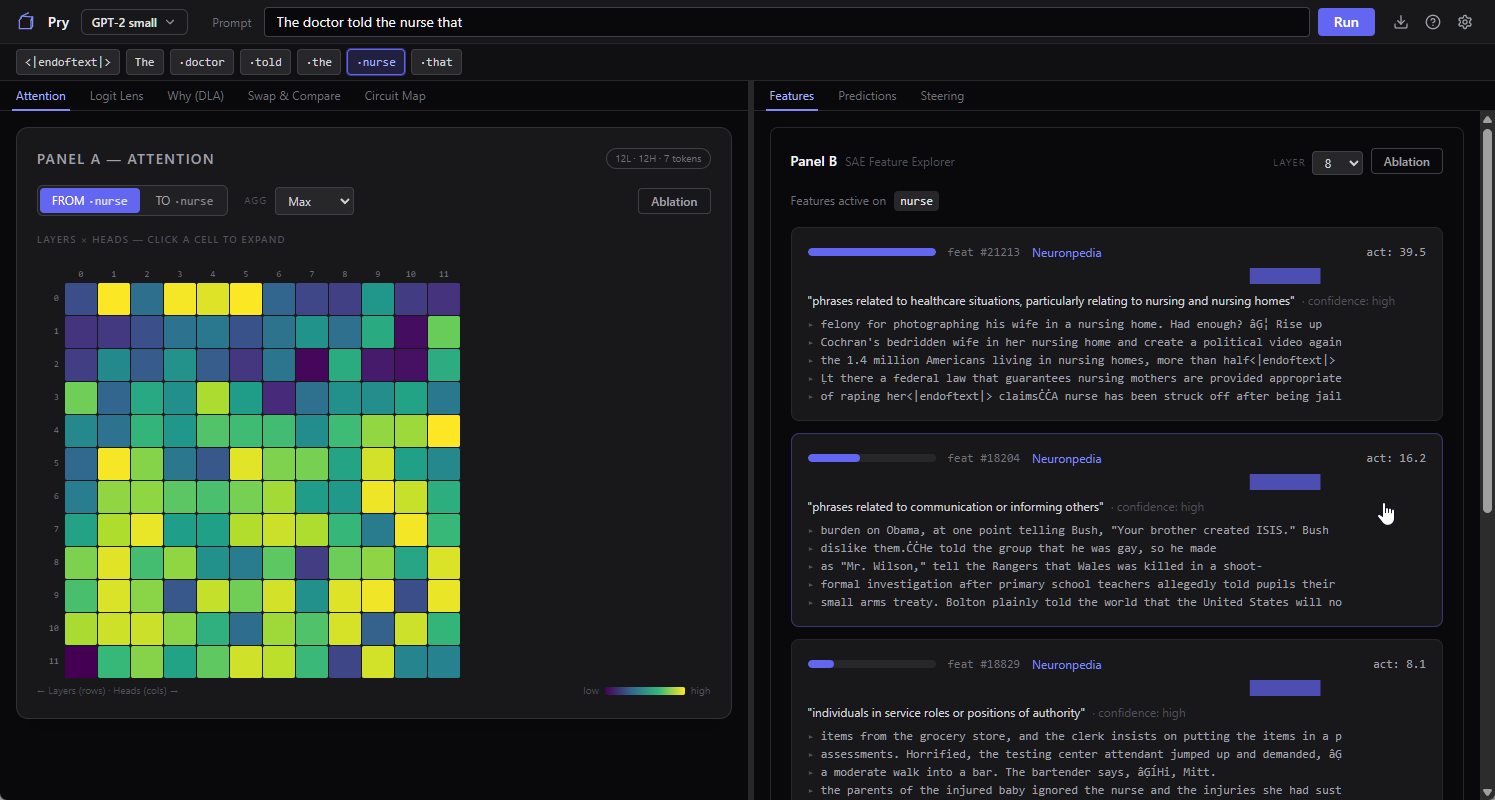
What you find on this specific prompt can be pretty interesting. Features fire for “medical professional,” makes sense. Features fire for “possessive pronouns,” fine. Features fire for gender-coded roles in ways that correlate pretty strongly with which profession got which pronoun in the training data (sometimes sexist, tbh, but in a “humanity is sexist so the training data is too” way, not really an issue with the encoder itself).
The model isn’t “biased” in the spooky anthropomorphic sense. It’s doing statistics on a corpus that was itself produced by a society. Everything downstream of that inherits the distribution. You look at enough of these prompts and the word “bias” starts to feel kind of inadequate for what you’re seeing. It’s more like the model has compressed a very large amount of our collective nonsense into a clean vocabulary of features, and the features just honestly report what they found.
Poking it
You’ve got a feature that fires. Pry lets you clamp that feature to whatever value you want (turn it up, turn it down, zero it out) and re-run the prompt with the clamp applied. The model generates a new completion with that one internal knob forcibly held. Everything else is the same. You compare the two outputs side by side.
Take the doctor/nurse prompt and let GPT-2 small run with it unsteered, and you get “he had been in a coma for a week and that he had been in a coma for a week,” the model looping like a scratched CD. Pick a feature that fires on the prompt, something you wouldn’t expect to matter much, like “text related to comparisons between different entities or situations,” suppress it hard, re-run. Now the output is “he had been told that he was going to die. ‘I’m going to die,’ he said. ‘I’m going to die.’” Same prompt, same model, same everything except that one internal dial, and the failure mode jumps from looping repetition to a death spiral.
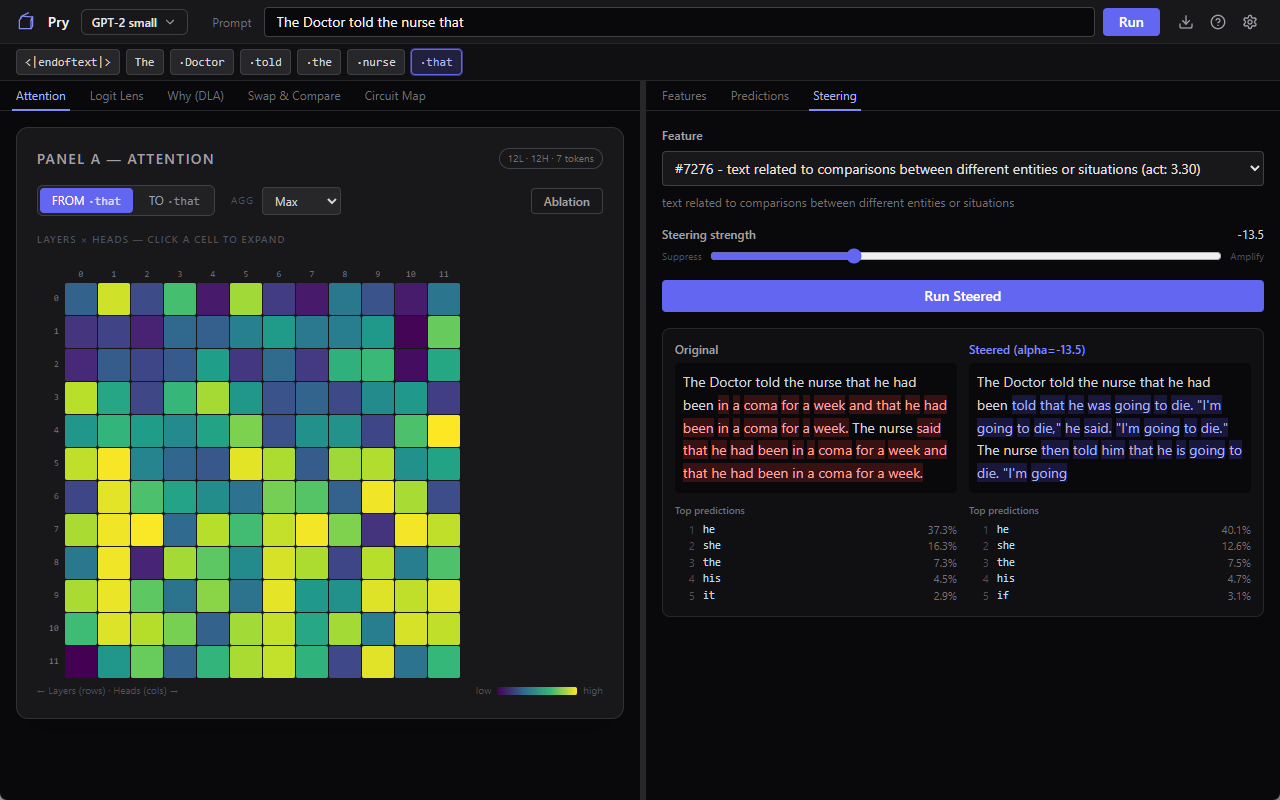
That’s the kind of thing you do steering for. If the output change matches your guess about what the feature was for, you’ve got evidence the feature is causally involved in that behavior, not just correlated with it. If it doesn’t match, you’ve just learned something too, usually that the Neuronpedia label was a best guess and the feature’s actual role is stranger than the label implies.
This is the move that gets interpretability past “we can see the gears turning.” With steering and ablation and activation patching (Pry has all three) you can actually intervene and measure. The difference between correlation and causation, inside a neural network, using buttons in a UI. Ten years ago this was a research-career-level undertaking. Now it’s a clamp slider and thirty seconds of your attention.
Why I wanted this to exist
I’ve got a whole separate thing I’m working on about AI safety and why I think the observational side of this field is under-resourced, but that’s a different post. The short version is that I kept meeting curious people (developers, researchers from other fields, AI-skeptical friends, actual lawyers) who had real questions about how these models work and no tractable on-ramp to finding out. “Just read the papers” is the git gud of machine learning advice. “Clone TransformerLens and run the tutorial notebooks” is, functionally, telling someone to learn Python, learn PyTorch, and learn a research library before they’re allowed to look at a model. The knowledge is already public. The libraries are already open source. The only thing missing was an installer and a UI that explains itself, so I built one. It’s not the only one, mind you, but the list IS pretty darn short, and I’m trying to make Pry the easiest to install and actually use.
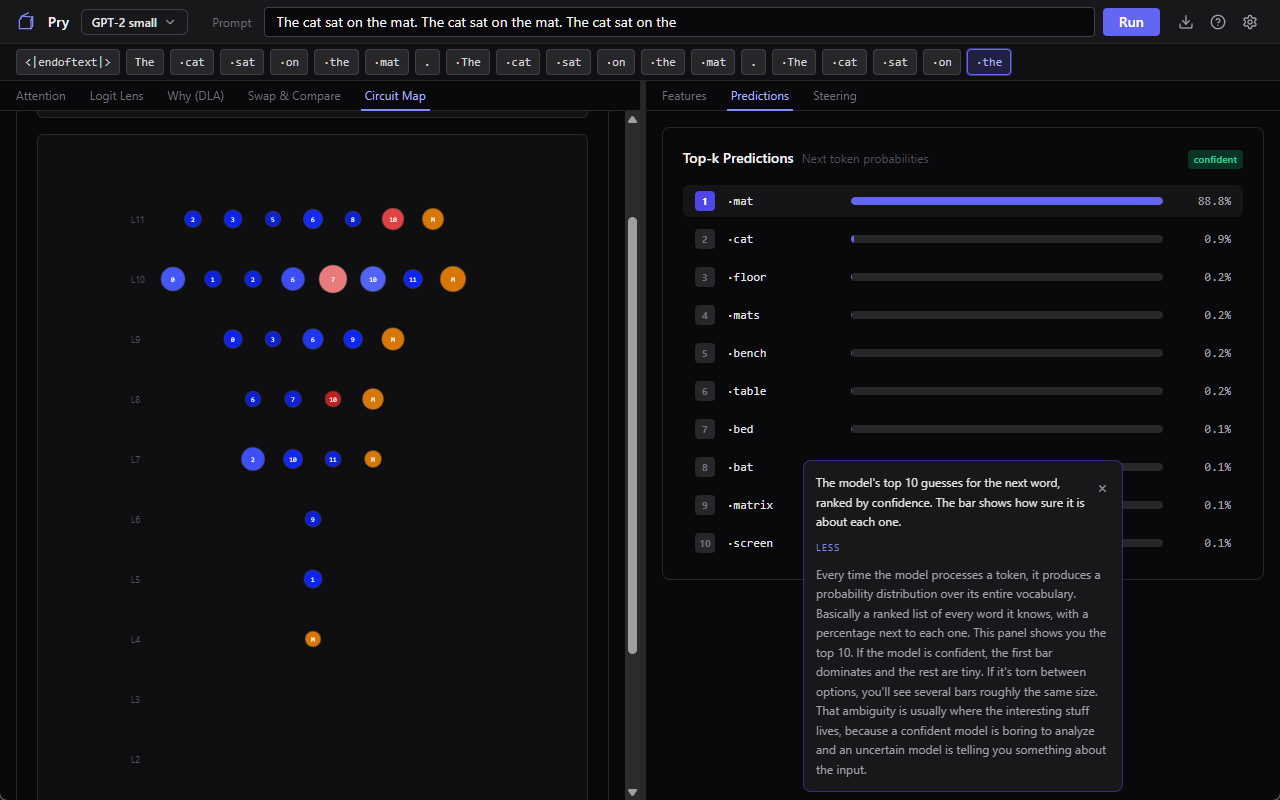
If you’re the kind of person who’s been curious about this stuff but don’t know where to start, here’s a way. Small model, minimal hardware needs to run well, every major tool the researchers use, and a tutorial that walks you through it (feel free to leave harsh comments about my choices of metaphors in the tool tips). You will not come out the other side able to publish in NeurIPS or anything, but hopefully you WILL come out with a much better intuition for what’s actually happening when a language model produces a token, which is sort of the bare minimum we should all have by now.
Download is here, if you’re curious, or if you’re the sort of person to download and run an app just to complain about its UI or whatever. Feedback is feedback at this point.
Great article, you have a talent for writing, clearly.
Nice work! A bit snowed under with various tasks at the moment but will definitely download if I get the chance, if only to check out those tool tip metaphors…